As part of the ongoing commitment to improving safety and productivity in the heavy vehicle industry, the National Heavy Vehicle Regulator (NHVR) has introduced an innovative tool: the next iteration of the National Network Map Route Planner. This tool is designed specifically for class two vehicles, excluding Performance Based Standards (PBS) vehicles, and is now available as of 29 May 2025. If you're involved in heavy vehicle operations, understanding how to use this route planner effectively can streamline your journey planning, ensure compliance with Chain of Responsibility (CoR) obligations under the Heavy Vehicle National Law (HVNL), and help you navigate permit requirements with ease.
In this article, we'll walk you through everything you need to know about the National Network Map Route Planner, how to use it, its features, and how it supports CoR Chain of Responsibility HVNL compliance. Whether you're a road manager, Supply Chain Manager or an industry operator, this guide will equip you with the knowledge to maximise the tool's potential and keep your operations smooth and lawful.
What Is the National Network Map Route Planner?
The National Network Map Route Planner is a digital tool embedded within NHVR Go, the NHVR’s online platform for regulatory tools and services. It allows operators of class two vehicles—except PBS vehicles—to create single, optimised routes directly from the national network map. This represents a significant step forward in digital route planning, providing a centralised and intuitive platform for plotting journeys that comply with regulations and road conditions.
Previously, route applications for vehicles with multiple waypoints or varying start and end points had to be made through NHVR Go using more complex processes. Now, the route planner simplifies single-route creation, making it faster and more accessible for operators to plan their trips.
Who Can Use the Route Planner?
- Class two vehicles (excluding PBS vehicles)
- Operators looking to create single routes with defined start and end points
- Road managers and industry personnel seeking regulatory compliance assistance
However, if your application involves multiple waypoints or different start and end points, you still need to use NHVR Go's application process.
How to Access and Use the National Network Map Route Planner
Getting started with the route planner is straightforward. The tool is accessed via the NHVR Go platform:
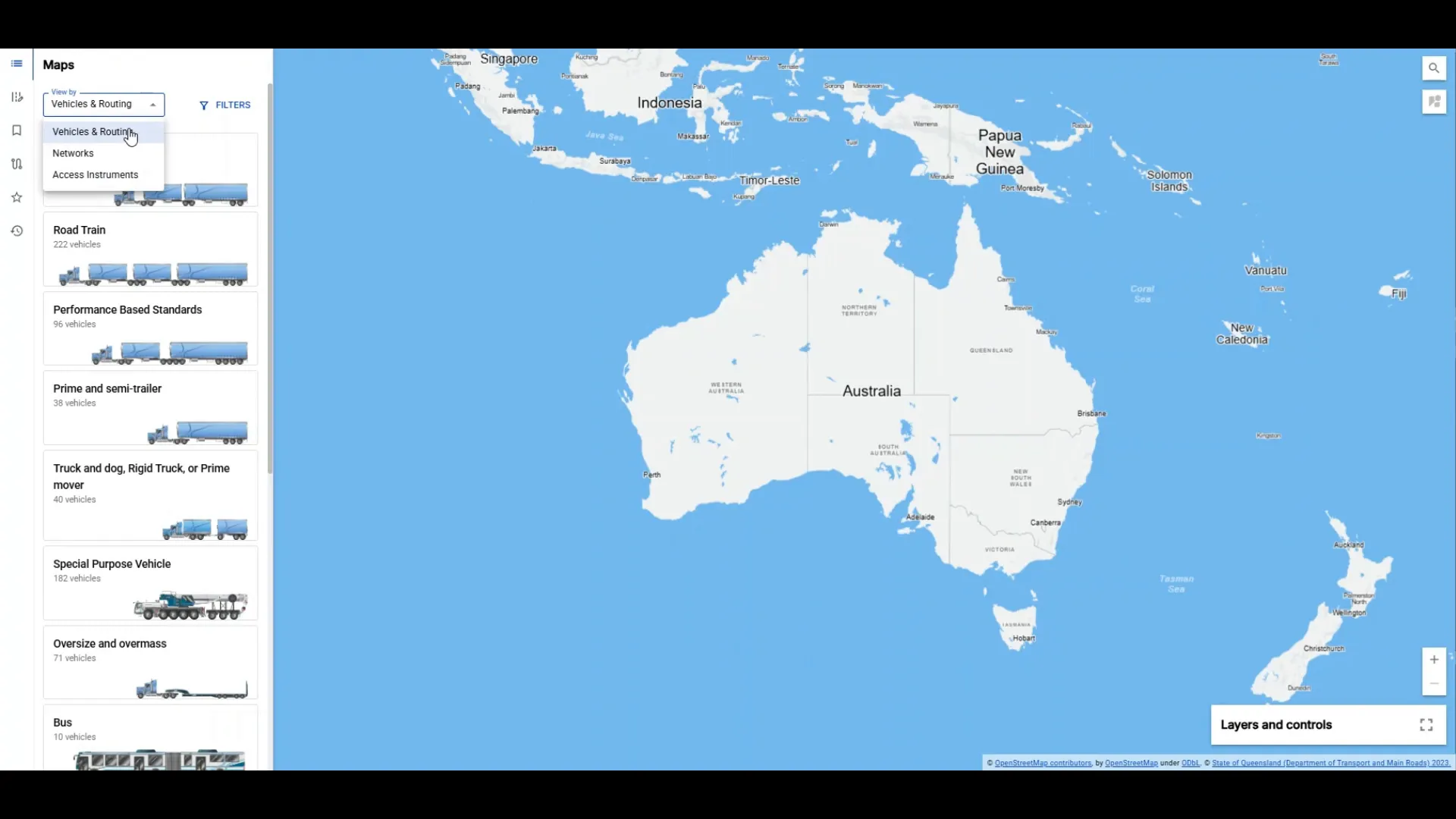
- Open the National Network Map in NHVR Go: Navigate to the NHVR Go portal and select the national network map option.
- Choose Your Vehicle: Under the "vehicles and routing" section, all eligible vehicles are listed. You can filter to select the specific vehicle you want to plan a route for.
- Select Vehicle via Network (Optional): Alternatively, select your vehicle by clicking on the chosen network and viewing additional information to see vehicles associated with that network.
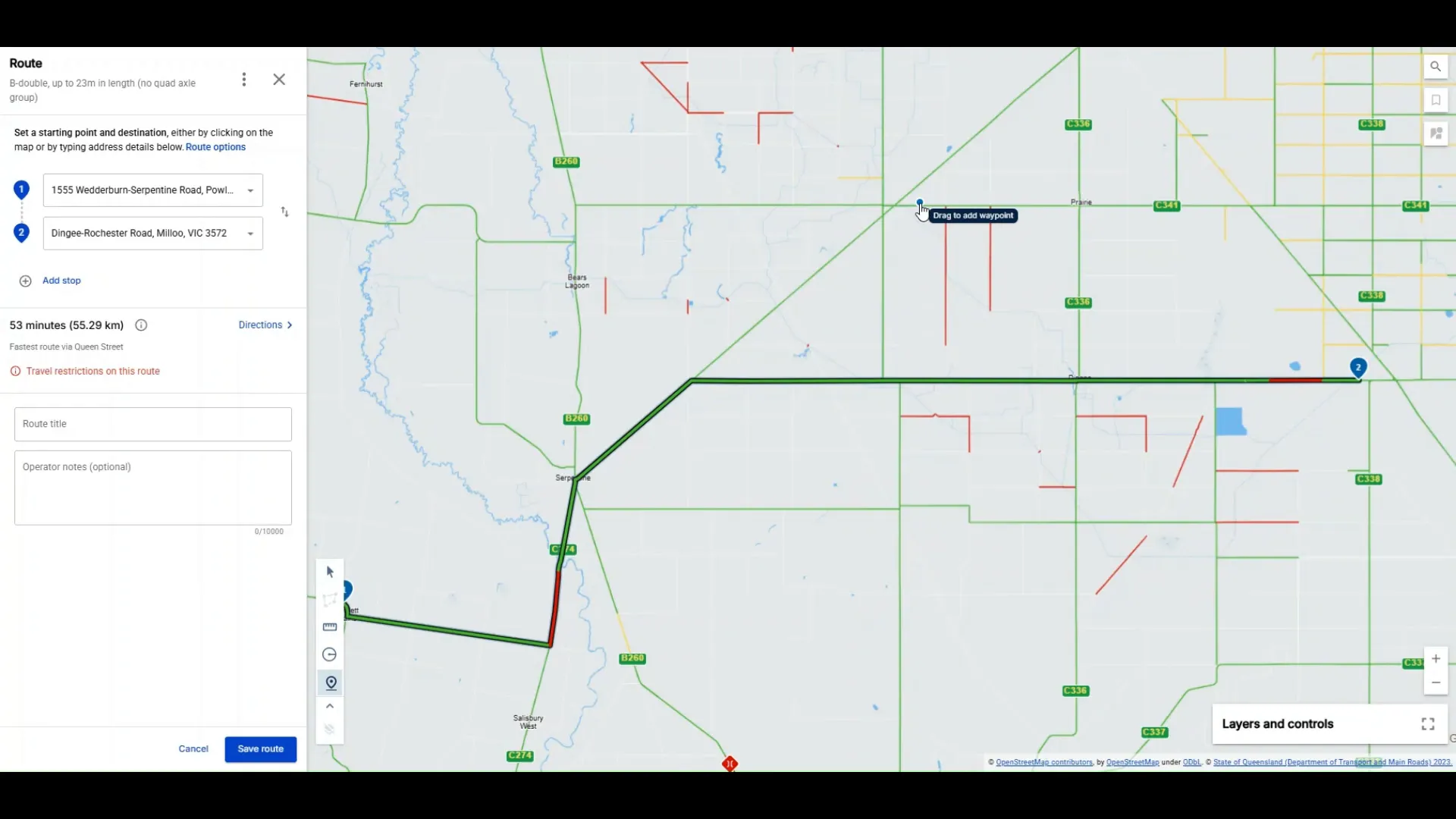
- Create a New Route: From the main screen, start plotting your route by entering waypoints. You can either type specific addresses or insert waypoints directly onto the map.
The system automatically calculates the fastest route between your waypoints, taking into account distance, road speed limits, and road surface types. This ensures that your planned journey is optimised for efficiency and compliance.
Customising Your Route
Once your initial route is generated, you can adjust it as needed:
- Drag and Drop: If you want to change the proposed path, simply drag the route line to a new location on the map.
- Route Options: Click the three dots at the top of the left-hand panel to toggle different routing options on or off, tailoring the route to your specific requirements.
- Estimated Time and Distance: The left panel also displays the estimated time and distance to complete the route, helping you plan your schedule effectively.
Saving, Sharing, and Managing Routes
To keep your routes organised and accessible, the route planner offers several management features:
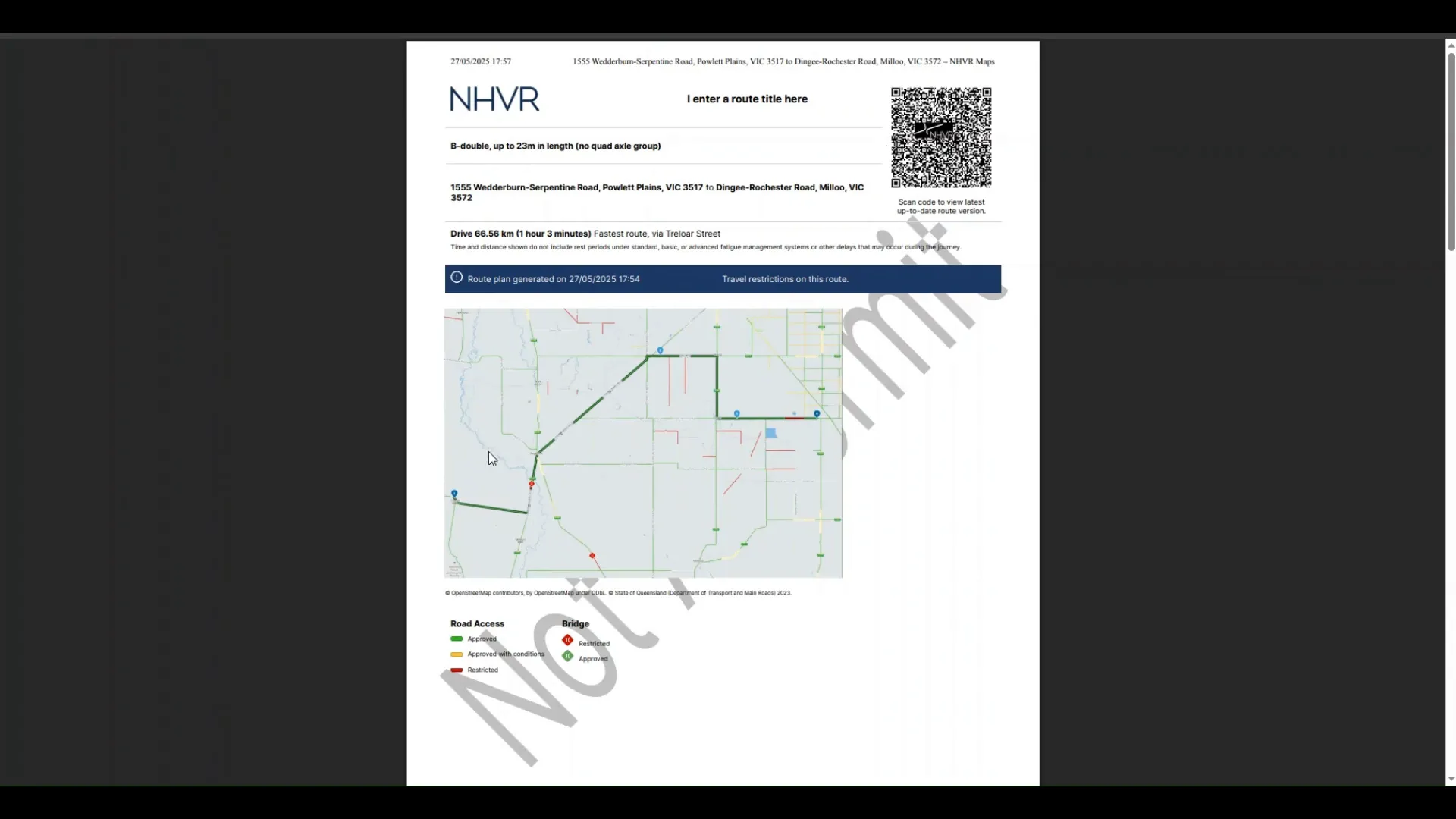
- Route Titles: Give each route a clear and descriptive title to identify it easily later.
- Operator Notes: Add specific notes relevant to the route or your operations.
- Save Routes: Save your route at any time by clicking the "save route" button. This also generates a unique route ID for future reference.
- Share Routes: After saving, routes can be shared with others by clicking on the directions tab and using the share icon.
- Print Directions: You can print turn-by-turn instructions for drivers or record-keeping by clicking the print icon.
Turn-by-Turn Directions and Restrictions
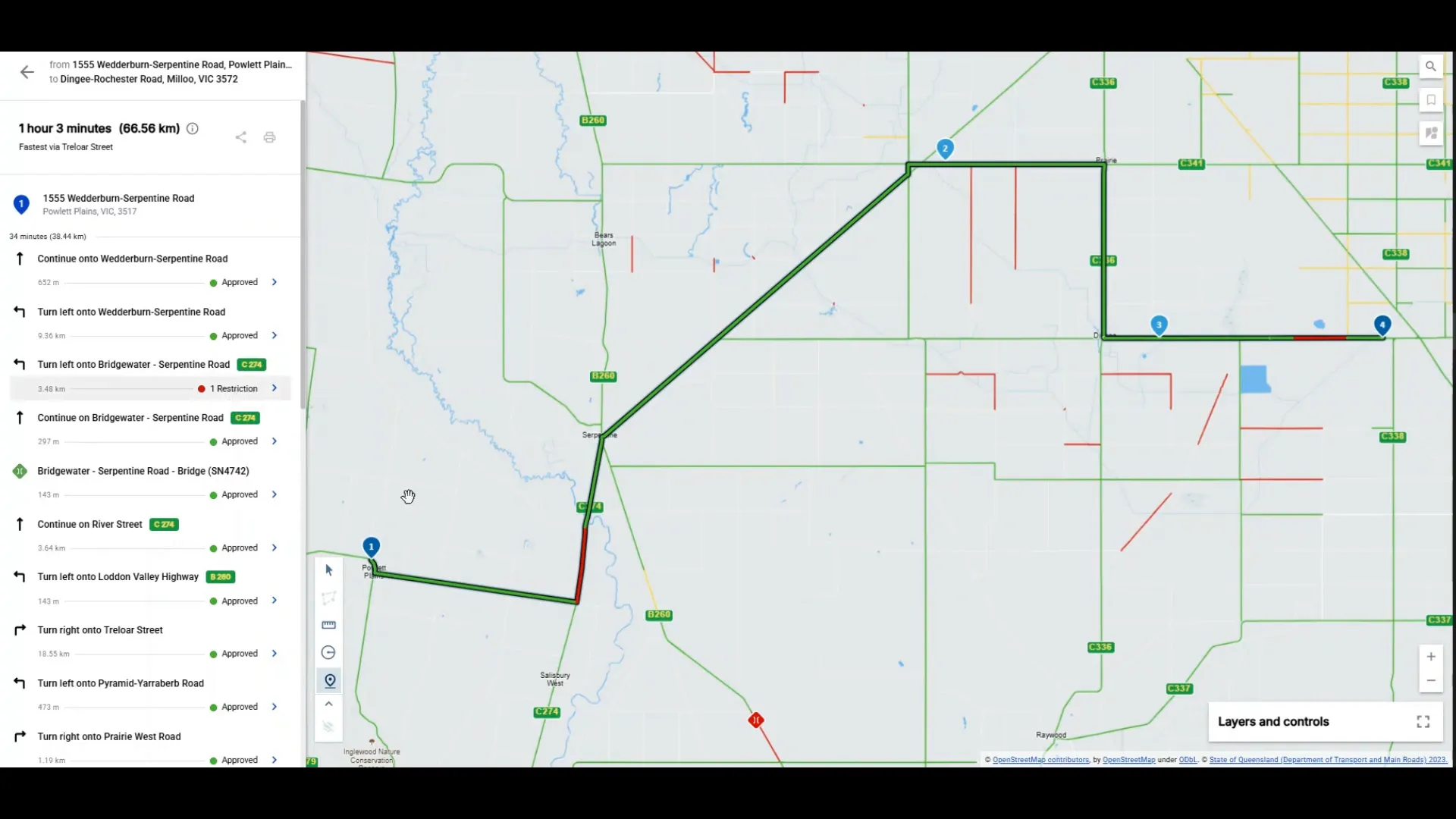
The directions tab provides detailed turn-by-turn instructions for the chosen route. Importantly, it highlights any conditional or restricted roads included in the route. By clicking on arrows next to these road sections, you can read specific restrictions or condition texts. If any section of the route might require a permit, this is clearly referenced to ensure you stay compliant.
Understanding the Limitations and Purpose of the Route Planner
While the National Network Map Route Planner is a powerful tool, it is designed to plot only single routes. For most class two vehicle applications, permit applications will still require an area application that contains up to one local government authority and one state jurisdiction.
This planner serves primarily as a guide to help users determine where permit applications may be necessary and to assist in planning the most appropriate and compliant route. It is not intended to replace more comprehensive application processes but to complement them by improving route visibility and planning efficiency.
Keeping Routes Updated and Compliant
One of the standout features of the route planner is its ability to reflect changes in the underlying network. Whenever there are updates to road conditions, restrictions, or network configurations, these changes are clearly shown on the map the next time a saved route is opened. This ensures that your routes remain accurate and compliant with the latest regulations.
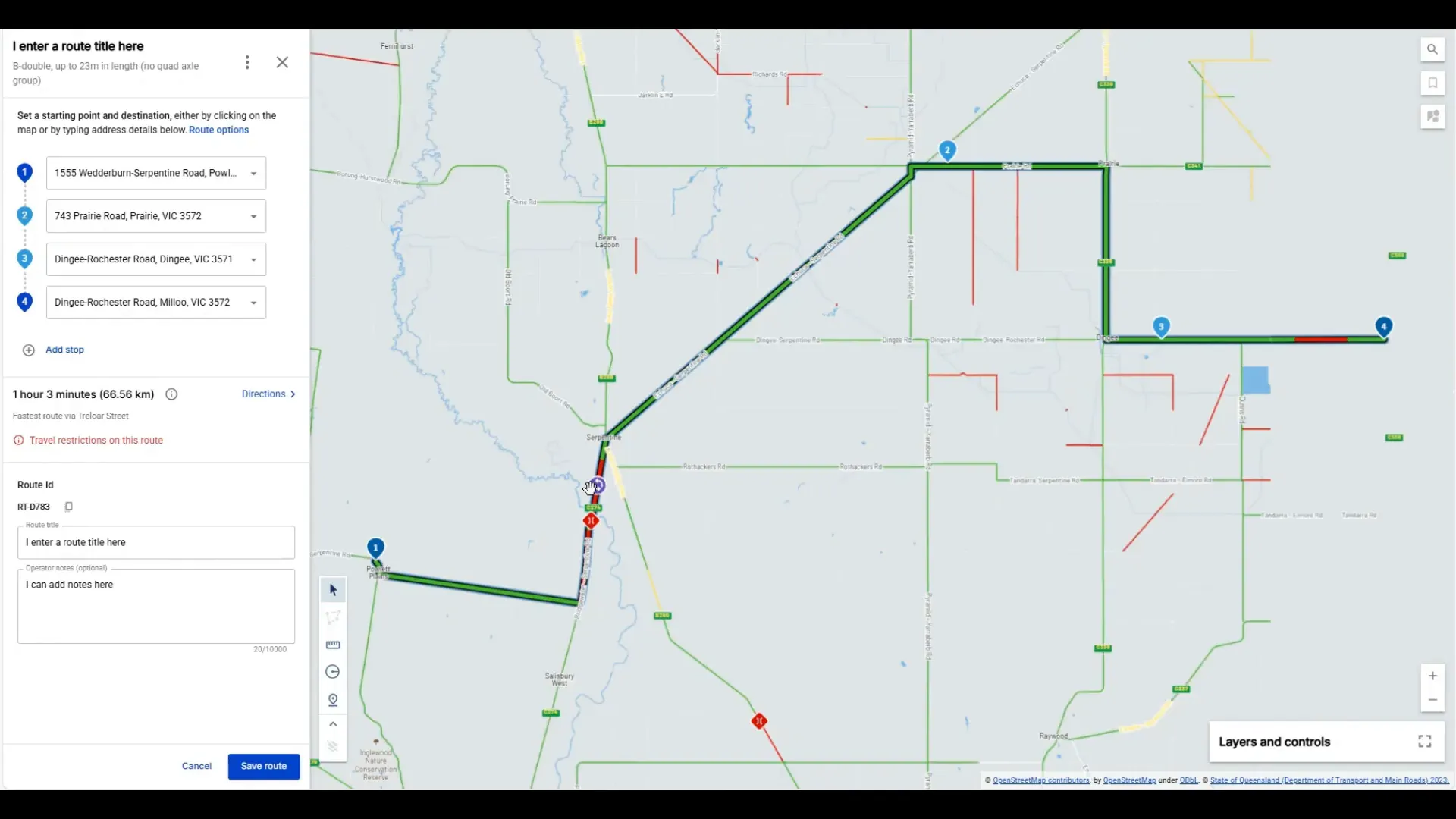
Updated routes are then saved against your existing route, keeping your planning consistent and up to date.
The Future of the National Network Map Route Planner
The current version of the route planner represents just the first stage of development. The NHVR is committed to advancing this technology to make routing safer, more efficient, and more productive across the entire heavy vehicle industry. As the tool evolves, we anticipate enhanced features, expanded vehicle eligibility, and deeper integration with permit applications and compliance systems.
For users, this means continued improvements in how you plan routes, manage compliance with CoR Chain of Responsibility HVNL requirements, and optimise your operations.
FAQs About the National Network Map Route Planner and CoR Chain of Responsibility HVNL
Q1: Can I use the route planner for PBS vehicles?
No, the National Network Map Route Planner currently excludes PBS vehicles. PBS vehicle routing and permit applications should be managed through NHVR Go’s other application processes.
Q2: How do I know if a route requires a permit?
The directions tab in the route planner highlights any sections of the route that may require permits. Restrictions and conditions are clearly indicated, and you can view detailed information by clicking on the arrows next to the relevant road segments.
Q3: Can I use the planner to create routes with multiple waypoints and different start and end points?
No, the current tool is designed for single routes only. For applications involving multiple waypoints or complex routing, you should use NHVR Go’s full application process.
Q4: How can I share a saved route with my team?
Once a route has been saved, click on the directions tab, then use the share icon on the left-hand panel to share the route ID and details with others.
Q5: How does this tool help with CoR Chain of Responsibility HVNL compliance?
The route planner aids operators by providing clear, compliant route options, highlighting permit requirements, and ensuring routes are planned according to up-to-date road conditions and restrictions. This supports operators’ and Supply Chain Partners' obligations under the CoR provisions of the HVNL by helping prevent non-compliant travel and ensuring safer, lawful operations.
*Q6: What is a permit-based scheme under the NHVR, and when does a transport operator need one?
A permit-based scheme is any program, pilot, or initiative where an operator must apply for a permit to use a specific heavy vehicle. These schemes aim to improve safety, efficiency, and productivity for certain vehicle types (e.g. performance-based standards, trials). Operators must meet set criteria and apply through the NHVR Portal or NHVR Go before using the vehicle on the road. Review the list of approved permit-based schemes, by state, through the portal.
In Summary & Next Steps
The National Network Map Route Planner is a game-changer for operators of class two heavy vehicles, providing a streamlined, user-friendly way to plan routes that comply with regulatory requirements and optimise travel efficiency. By integrating vehicle selection, dynamic routing based on road conditions, permit requirement alerts, and sharing capabilities, this tool supports the heavy vehicle industry’s ongoing commitment to safety and compliance within the CoR Chain of Responsibility HVNL framework.
As the NHVR continues to develop and enhance this technology, operators can expect even more powerful features to help navigate Australia’s complex road networks safely and productively. For questions, feedback, or support, the NHVR contact center is always ready to assist.
To start using the National Network Map Route Planner today, visit NHVR Go and experience the future of heavy vehicle route planning.
This article was created from the video Route Planner in the National Network Map
Additional Information for further research and validation below
Appendix - Links to NHVR below
As a road manager overseeing winery and bottling operations in South Australia, it’s crucial to ensure that transport operators comply with the National Heavy Vehicle Regulator (NHVR) guidelines. Here’s a simplified overview of the key requirements and processes:
🚛 Vehicle Access Overview
B-Doubles
-
General Access: B-doubles can operate without a permit on approved routes under the National Class 2 B-double Authorisation Notice 2024 (No.1).
-
Permit Requirement: If the intended route is not part of the approved network, operators must apply for a B-double permit.
Road Trains
-
General Access: Compliant road trains can operate on designated routes under the National Class 2 Road Train Authorisation Notice 2025 (No.1).
-
Permit Requirement: For routes outside the approved network, a road train permit is necessary.
🛣️ Route Planning and Permits
-
NHVR Route Planner: Operators should use the NHVR Route Planner to identify approved routes and determine if a permit is required.
-
Permit Applications: Permits can be applied for via the NHVR Portal. The NHVR coordinates with relevant road managers to assess and approve applications.
📄 Additional Considerations
-
Class 3 Combinations: For vehicles that do not comply with standard dimensions or mass limits, such as certain B-double configurations, a Class 3 permit may be required.
-
State-Specific Notices: South Australia has specific notices that may apply to certain vehicle types or operations. Operators should consult the South Australia Notices for detailed information.
-
Check Routes: Always verify if the intended route is approved for the vehicle type using the NHVR Route Planner.
-
Apply for Permits: If the route is not approved, ensure that operators apply for the necessary permits well in advance.
-
Stay Informed: Regularly review NHVR updates and state-specific notices to remain compliant with any changes in regulations.
Transport Access and CoR Risk Check – Winery & Bottling Operations
Question
NHVR Reference
Correct Response
Have we validated that the entry and exit roads to our site are approved for the vehicle types we receive (e.g. B-double vs Road Train), not just the space available onsite?
✅ Yes – Confirm vehicle type matches NHVR-approved access level for all routes, not just onsite layout.
Do site-based Traffic Management Plans (TMPs) consider the maximum approved vehicle access under the NHVR notices and road manager restrictions—or just internal physical layout (e.g. turning circles, dock space)?
✅ Yes – TMPs must include external access conditions aligned to NHVR Notices or permit requirements.
Have we mapped the permitted combinations (e.g. 30-metre road trains, 26-metre B-doubles) against our common delivery and pickup routes using the NHVR Route Planner?
✅ Yes – Routinely validate permitted lengths and combinations using NHVR Route Planner.
Do we require transport operators to validate their route approval using permits, maps, or NHVR route planner screenshots before arriving on site with a Class 2 or 3 vehicle?
✅ Yes – Request proof of access or permit as part of onboarding or seasonal engagement.
Are we maintaining a register or log of vehicle types accessing the site, including those operating under Class 2 and Class 3 notices or permits?
✅ Yes – Maintain documented access log to support CoR due diligence.
Do we request a copy of the transport operator’s valid permit or notice reference when they operate vehicles exceeding General Access limits?
✅ Yes – Site should verify and retain copy of permit or relevant notice authorisation.
How are new or seasonal contractors (e.g. vintage grape hauliers) informed of site access conditions and mass/configuration restrictions?
✅ Through site induction, onboarding guides and access route map sharing.
Who at the site is responsible under Chain of Responsibility (CoR) for ensuring that access conditions are not breached due to scheduling, loading, or TMP assumptions?
✅ Site Manager and Scheduler hold CoR duties under HVNL (s26C–s26F).
If a site requests a particular configuration (e.g. road train or dog trailer), has anyone checked if the transport provider can legally use that route under the applicable NHVR notice?
✅ Yes – Confirmation must be obtained before instructing contractor.
Have staff involved in vehicle scheduling or site planning received CoR awareness training?
✅ Yes – CoR awareness training must be part of WHS/Induction.


